All about product
 Reviews
0
 INSTRUCTION FOR USE
CAD/CAM Libraries
INSTRUCTION FOR USE
CAD/CAM Libraries
Recommended
Bestseller
Special
In Stock
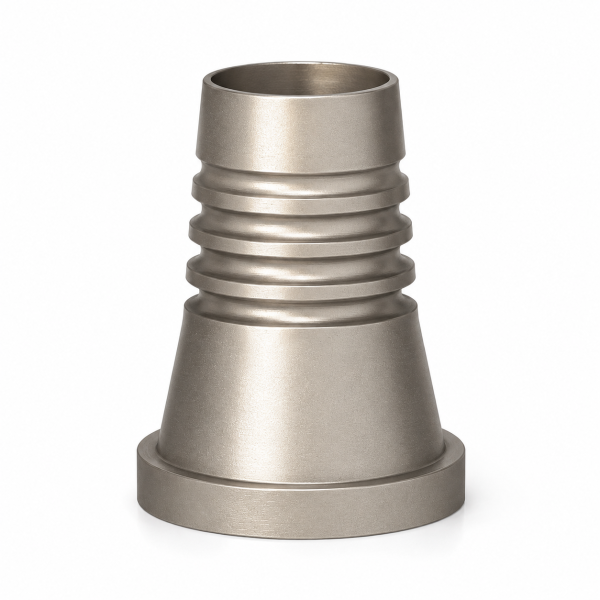
Product Code: 690764
Brand: DMi
Reviews:
0
Found cheaper?
$38.00
Ex Tax:
$38.00
Buy in 1 click:

Product Description
Titanium Base for Multi-Unit M1.6
The Titanium Base for Multi-Unit M1.6 is a precision-engineered prosthetic component designed for screw-retained bridge restorations on multiple osseointegrated implants. It is specifically developed for use with slim esthetic connector abutments (Ø 4.7 mm), providing a stable and reliable foundation for customized zirconia bridge frameworks.
The titanium base features a straight design with a defined shoulder and is intentionally manufactured without an anti-rotation element, allowing for passive fit in multi-unit bridge restorations. This design facilitates accurate seating and stress-free positioning of prosthetic structures across multiple implants.
Manufactured from high-quality medical-grade titanium alloy (Ti6Al4V ASTM F136), the component ensures excellent strength, durability, and biocompatibility for long-term clinical performance.
Technical Specifications
- Diameter: 4.7 mm
- Body Height: 4.0 mm
- Shoulder Height: 1.0 mm
- Connection: M1.6 (UNF)
Key Features
- Designed for screw-retained multi-unit bridge restorations
- Compatible with slim esthetic connector abutments Ø 4.7 mm (e.g., 611537 series)
- Non-anti-rotational design for passive fit across multiple implants
- Secure fixation using titanium screw (701200, M1.6 UNF)
- Compatible with 1.25 mm Allen key
- High-strength medical-grade titanium alloy
Indications & Applications
The Titanium Base is intended for:
- Fabrication of customized zirconia bridges
- Multi-unit restorations on two or more implants
- Use with slim esthetic connector abutments Ø 4.7 mm
- Screw-retained prosthetic solutions
Clinical Benefits
- Passive fit design reduces stress on implants
- Ideal for full-arch and multi-unit restorations
- Supports accurate and stable prosthetic frameworks
- Enhances long-term mechanical reliability
Sterilization & Handling
- Supplied non-sterile
- Must be sterilized before use
- Sterilize in autoclave at 135°C / 274°F
Advantages
- High precision and durability
- Optimized for multi-unit bridge restorations
- Reliable screw-retained fixation
- Compatible with modern implant systems
The Titanium Base for Multi-Unit M1.6 is a precision-engineered prosthetic component designed for screw-retained bridge restorations on multiple osseointegrated implants. It is specifically developed for use with slim esthetic connector abutments (Ø 4.7 mm), providing a stable and reliable foundation for customized zirconia bridge frameworks.
The titanium base features a straight design with a defined shoulder and is intentionally manufactured without an anti-rotation element, allowing for passive fit in multi-unit bridge restorations. This design facilitates accurate seating and stress-free positioning of prosthetic structures across multiple implants.
Manufactured from high-quality medical-grade titanium alloy (Ti6Al4V ASTM F136), the component ensures excellent strength, durability, and biocompatibility for long-term clinical performance.
Technical Specifications
- Diameter: 4.7 mm
- Body Height: 4.0 mm
- Shoulder Height: 1.0 mm
- Connection: M1.6 (UNF)
Key Features
- Designed for screw-retained multi-unit bridge restorations
- Compatible with slim esthetic connector abutments Ø 4.7 mm (e.g., 611537 series)
- Non-anti-rotational design for passive fit across multiple implants
- Secure fixation using titanium screw (701200, M1.6 UNF)
- Compatible with 1.25 mm Allen key
- High-strength medical-grade titanium alloy
Indications & Applications
The Titanium Base is intended for:
- Fabrication of customized zirconia bridges
- Multi-unit restorations on two or more implants
- Use with slim esthetic connector abutments Ø 4.7 mm
- Screw-retained prosthetic solutions
Clinical Benefits
- Passive fit design reduces stress on implants
- Ideal for full-arch and multi-unit restorations
- Supports accurate and stable prosthetic frameworks
- Enhances long-term mechanical reliability
Sterilization & Handling
- Supplied non-sterile
- Must be sterilized before use
- Sterilize in autoclave at 135°C / 274°F
Advantages
- High precision and durability
- Optimized for multi-unit bridge restorations
- Reliable screw-retained fixation
- Compatible with modern implant systems

Reviews
There are no reviews for this product, be the first to leave your review.


Multi-Unit Method
For bridge prostheses with screw fixation and using a multi-unit.
Main characteristics: Abutments, fixed prosthetics, screw fixation, prosthesis on an abutment.
The impression is obtained using the open spoon method with screw-fixed transfer on a multi-unit or using intraoral scanning using scan transfers with screw-fixed transfer on a multi-unit. For this method, straight and angular multi-units are used - this is a non-removable abutment with a ledge in the crown part, having a convergence of the walls at an angle of 30 degrees (straight - 610537, etc., angular 15 degrees - 630537, etc., angular 25 degrees - 631537, etc.). 610537, etc., 610548, etc., 611520, etc., 611557, etc., 631537, etc. These devices are intended only for restoration on two or more osseointegrated implants. The ledge should be installed below the level of the gingival margin to achieve an aesthetic result. Multi-units have a height of 0.5 mm, 1.5 mm, 2.5 mm, 3.5 mm, 4.5 mm and are selected in accordance with the thickness of the gum and the height of the gingival margin above the implant. The doctor removes the gingival former from the implant and selects a multi-unit for each implant in accordance with the height of the gingival margin. After this, an impression is taken:
- the first option is by the open spoon method using a transfer (900037, etc.)
- the second option is scanned using a transfer sphere for scanning (900137, etc.).
Option 1
The dentist removes the healing cap (240347, etc.) from the multi-unit. Installs the multi-unit transfers (900037) for the open tray and fixes them with the transfer screw. It is advisable to connect the transfers between themselves with quick-hardening plastic. A hole is made in the impression tray for the transfer screws. The first and second layers are mixed and introduced simultaneously. After the impression mass has hardened, the transfer screws are unscrewed. When taking an impression from the oral cavity, the transfers (900037) remain inside the impression mass. After taking the impression and removing the transfer from the multi-unit, the healing cap (240347, etc.) is screwed onto the multi-unit. The impression is sent to the dental technician. The technician screws the transfers (900037) into the impression mass using a transfer screw, a laboratory analogue of the multi-unit (920037) and makes a plaster model with analogues of an osseointegrated implant + multi-unit.
Dental laboratory.
The technician attaches a laboratory analogue of the multi-unit (920037) to the multi-unit transfers (900037), which are in the impression, using a transfer screw and makes a plaster model with analogues of the osseointegrated implant + multi-unit. Then there are several options:
- The technician attaches titanium sleeves for the multi-unit (680048) to the analogues of the multi-unit (920037). Models and makes a temporary plastic prosthetic structure with screw fixation. The finished temporary prosthetic structure with screw fixation is transferred to the clinic. -Another method of manufacturing permanent prosthetics on multi-units in the dental laboratory - the technician attaches plastic sleeves for the multi-unit (680047) to the multi-unit analogues (920037) for modeling and casting a metal base for a permanent or temporary prosthetic structure with screw fixation. After receiving the metal part of the prosthetic structure, the dentist removes the healing cap (240347, etc.) from the multi-unit, inserts a permanent or temporary metal structure onto the multi-unit and fixes it to the multi-unit using a titanium screw M1.6 (701200). Checks that the metal body/structure passively rests on the multi-unit. Then it is necessary to tighten the screw with a force of at least 30 N to fix the prosthesis and an X-ray is taken to ensure the accuracy of the fit of the prosthetic structure on the ledge of the multi-unit. If the fit is not accurate, it is necessary to cut the body/structure, attach each fragment separately and connect them using fast-hardening acrylic, then repeat the try-in and achieve a passive fit of the prosthesis. If the body/structure is attached well, the dentist selects the color of the veneer and hands it over to the technician for porcelain veneering. After the body/structure is removed from the multi-unit, a healing cap (240347, etc.) is screwed onto the multi-unit.
- Another method of making temporary and permanent prosthetics on multi-units in a dental laboratory is that the technician attaches a scan transfer (900137) to the multi-unit analogs (920037) on the model, then scans, obtains a virtual model and models and makes a prosthetic structure using a program. Then a titanium base (690764) is cemented to the manufactured prosthetic structure. The finished prosthetic structure with screw fixation is transferred to the clinic.
- Another method of making temporary and permanent prosthetics on multi-units in a dental laboratory - a technician attaches titanium sleeves for multi-units (680048) to the analogs of multi-units (920037) on the model. The technician can cut off part of the sleeve, process it according to the indications, . Then he scans, gets a virtual model and, using the program, models and makes a prosthetic structure. Then he cements titanium sleeves for multi-units (680048) to the prosthetic structure with or without trimming, depending on which part was scanned. The finished prosthetic structure with screw fixation is transferred to the clinic.
The second option is scanned using a scanning transfer sphere (900137, etc.).
Option 2
The dentist removes the healing cap (240347, etc.) from the multi-unit. Installs the scan transfers of the multi-unit (900137) on the multi-unit and fixes it with a titanium screw (701200). Scanning is performed with an intraoral camera. After removing the scan and removing the transfer from the multi-unit, the healing cap (240347, etc.) is screwed onto the multi-unit. The file is sent by e-mail to the dental technician.
Dental laboratory.
Then there are:
1st - The technician uses the program to print a plastic model using a digital laboratory analogue of the multi-unit (921037) and receives a model with analogues of the osseointegrated implant + multi-unit. And it can work as indicated above. The plastic model with analogs and the plaster model with analogs are identical.
2st - The technician, using the program, prepares a virtual model with virtual analogs. And then using the program on the virtual model, builds permanent prosthetics using a titanium base for multi-units (690764).
Important points are the accuracy of the fit of permanent prosthetics on multi-units. Intraoral scanners can give distortions from 30 to 300 microns. And this does not provide an accurate fit of permanent prosthetics on multi-units. To solve this problem, use the "Index" - the creation of an additional geometric model. There are 2 types of "Index":
- 1st use of a special scanner with sensors for building geometric models. Then this geometric model is connected with intraoral scanning and this increases the accuracy of the virtual model with analogs of multi-units.
- 2nd use of multi-unit transfers for an open spoon (900037). We install transfers (900037) on multi-units using a transfer screw. We connect the transfers with quick-hardening plastic. We unscrew the transfer screw and remove the transfers from the oral cavity. We connect the transfers (900037) with the analogs of the multi units (920037) using the screw of the transformer. We immerse the lower part of the analog of the multi units (920037) in the prepared plaster. After the plaster hardens, we unscrew the transfer screw and remove the transfers connected with quick-hardening plastic. We get the "Index" - the exact geometric location of the implants. The dental technician cements the finished prosthetics of the titanium bases (690764) on this "Index".
After receiving the finished prosthetic structure, the healing cap (240347, etc.) is removed from the multi-unit, the finished prosthesis is again checked for passive fit. The finished prosthetic structure is fixed to the multi-unit using a titanium screw M1.6 (701200), the screw is tightened with a force of 30N and an X-ray is taken to ensure the accuracy of the fit of the prosthetic structure on the ledge of the multi-unit. After fixing with screws, the holes are closed with silicone or gutta-percha and composite in accordance with the color of the crown.
For bridge prostheses with screw fixation and using a multi-unit.
Main characteristics: Abutments, fixed prosthetics, screw fixation, prosthesis on an abutment.
The impression is obtained using the open spoon method with screw-fixed transfer on a multi-unit or using intraoral scanning using scan transfers with screw-fixed transfer on a multi-unit. For this method, straight and angular multi-units are used - this is a non-removable abutment with a ledge in the crown part, having a convergence of the walls at an angle of 30 degrees (straight - 610537, etc., angular 15 degrees - 630537, etc., angular 25 degrees - 631537, etc.). 610537, etc., 610548, etc., 611520, etc., 611557, etc., 631537, etc. These devices are intended only for restoration on two or more osseointegrated implants. The ledge should be installed below the level of the gingival margin to achieve an aesthetic result. Multi-units have a height of 0.5 mm, 1.5 mm, 2.5 mm, 3.5 mm, 4.5 mm and are selected in accordance with the thickness of the gum and the height of the gingival margin above the implant. The doctor removes the gingival former from the implant and selects a multi-unit for each implant in accordance with the height of the gingival margin. After this, an impression is taken:
- the first option is by the open spoon method using a transfer (900037, etc.)
- the second option is scanned using a transfer sphere for scanning (900137, etc.).
Option 1
The dentist removes the healing cap (240347, etc.) from the multi-unit. Installs the multi-unit transfers (900037) for the open tray and fixes them with the transfer screw. It is advisable to connect the transfers between themselves with quick-hardening plastic. A hole is made in the impression tray for the transfer screws. The first and second layers are mixed and introduced simultaneously. After the impression mass has hardened, the transfer screws are unscrewed. When taking an impression from the oral cavity, the transfers (900037) remain inside the impression mass. After taking the impression and removing the transfer from the multi-unit, the healing cap (240347, etc.) is screwed onto the multi-unit. The impression is sent to the dental technician. The technician screws the transfers (900037) into the impression mass using a transfer screw, a laboratory analogue of the multi-unit (920037) and makes a plaster model with analogues of an osseointegrated implant + multi-unit.
Dental laboratory.
The technician attaches a laboratory analogue of the multi-unit (920037) to the multi-unit transfers (900037), which are in the impression, using a transfer screw and makes a plaster model with analogues of the osseointegrated implant + multi-unit. Then there are several options:
- The technician attaches titanium sleeves for the multi-unit (680048) to the analogues of the multi-unit (920037). Models and makes a temporary plastic prosthetic structure with screw fixation. The finished temporary prosthetic structure with screw fixation is transferred to the clinic. -Another method of manufacturing permanent prosthetics on multi-units in the dental laboratory - the technician attaches plastic sleeves for the multi-unit (680047) to the multi-unit analogues (920037) for modeling and casting a metal base for a permanent or temporary prosthetic structure with screw fixation. After receiving the metal part of the prosthetic structure, the dentist removes the healing cap (240347, etc.) from the multi-unit, inserts a permanent or temporary metal structure onto the multi-unit and fixes it to the multi-unit using a titanium screw M1.6 (701200). Checks that the metal body/structure passively rests on the multi-unit. Then it is necessary to tighten the screw with a force of at least 30 N to fix the prosthesis and an X-ray is taken to ensure the accuracy of the fit of the prosthetic structure on the ledge of the multi-unit. If the fit is not accurate, it is necessary to cut the body/structure, attach each fragment separately and connect them using fast-hardening acrylic, then repeat the try-in and achieve a passive fit of the prosthesis. If the body/structure is attached well, the dentist selects the color of the veneer and hands it over to the technician for porcelain veneering. After the body/structure is removed from the multi-unit, a healing cap (240347, etc.) is screwed onto the multi-unit.
- Another method of making temporary and permanent prosthetics on multi-units in a dental laboratory is that the technician attaches a scan transfer (900137) to the multi-unit analogs (920037) on the model, then scans, obtains a virtual model and models and makes a prosthetic structure using a program. Then a titanium base (690764) is cemented to the manufactured prosthetic structure. The finished prosthetic structure with screw fixation is transferred to the clinic.
- Another method of making temporary and permanent prosthetics on multi-units in a dental laboratory - a technician attaches titanium sleeves for multi-units (680048) to the analogs of multi-units (920037) on the model. The technician can cut off part of the sleeve, process it according to the indications, . Then he scans, gets a virtual model and, using the program, models and makes a prosthetic structure. Then he cements titanium sleeves for multi-units (680048) to the prosthetic structure with or without trimming, depending on which part was scanned. The finished prosthetic structure with screw fixation is transferred to the clinic.
The second option is scanned using a scanning transfer sphere (900137, etc.).
Option 2
The dentist removes the healing cap (240347, etc.) from the multi-unit. Installs the scan transfers of the multi-unit (900137) on the multi-unit and fixes it with a titanium screw (701200). Scanning is performed with an intraoral camera. After removing the scan and removing the transfer from the multi-unit, the healing cap (240347, etc.) is screwed onto the multi-unit. The file is sent by e-mail to the dental technician.
Dental laboratory.
Then there are:
1st - The technician uses the program to print a plastic model using a digital laboratory analogue of the multi-unit (921037) and receives a model with analogues of the osseointegrated implant + multi-unit. And it can work as indicated above. The plastic model with analogs and the plaster model with analogs are identical.
2st - The technician, using the program, prepares a virtual model with virtual analogs. And then using the program on the virtual model, builds permanent prosthetics using a titanium base for multi-units (690764).
Important points are the accuracy of the fit of permanent prosthetics on multi-units. Intraoral scanners can give distortions from 30 to 300 microns. And this does not provide an accurate fit of permanent prosthetics on multi-units. To solve this problem, use the "Index" - the creation of an additional geometric model. There are 2 types of "Index":
- 1st use of a special scanner with sensors for building geometric models. Then this geometric model is connected with intraoral scanning and this increases the accuracy of the virtual model with analogs of multi-units.
- 2nd use of multi-unit transfers for an open spoon (900037). We install transfers (900037) on multi-units using a transfer screw. We connect the transfers with quick-hardening plastic. We unscrew the transfer screw and remove the transfers from the oral cavity. We connect the transfers (900037) with the analogs of the multi units (920037) using the screw of the transformer. We immerse the lower part of the analog of the multi units (920037) in the prepared plaster. After the plaster hardens, we unscrew the transfer screw and remove the transfers connected with quick-hardening plastic. We get the "Index" - the exact geometric location of the implants. The dental technician cements the finished prosthetics of the titanium bases (690764) on this "Index".
After receiving the finished prosthetic structure, the healing cap (240347, etc.) is removed from the multi-unit, the finished prosthesis is again checked for passive fit. The finished prosthetic structure is fixed to the multi-unit using a titanium screw M1.6 (701200), the screw is tightened with a force of 30N and an X-ray is taken to ensure the accuracy of the fit of the prosthetic structure on the ledge of the multi-unit. After fixing with screws, the holes are closed with silicone or gutta-percha and composite in accordance with the color of the crown.
CadCam
Titanium Base for Multi-Unit M1.6
$38.00


-228x228.png "Titanium Screw for Esthetic Multi-Unit M1.6")